

We redesigned our website!
See into the making of the site, what issues we've encountered, and more.
Hi there! If you’re reading this, we recently completed a massive visual overhaul of our website. This is pretty exciting for us, and there’s plenty going on with it, too.
Stick around if you want to see struggling and cool tech along the way.
Why a redesign?
Our old website looked quite rough compared to our competition.
Redesign goals
When Bea redesigned our website, she was focused on the following:
- A more saturated, darker “dark mode”
- Designing with the flat-ish modern tech look in mind, with a friendly “softness” to it
- Looking more trustworthy in general
Tech stack
We’ve been pretty happy with the majority of our tooling, both on the front and backends. Virtually all of it transferred from the old site to this one.
As a quick summary, our front-end stack has previously and still consists of:
- Astro as our metaframework
- No web framework(!), other than Astro components with TypeScript
- Plain CSS for styling the site (Astro does some CSS scoping for us)
Our back-end stack also hasn’t changed, with the following:
- Astro Actions for things we don’t or can’t simply statically generate
- NetCord for our Discord bot ticket bridge
- WHMCS for our store backend
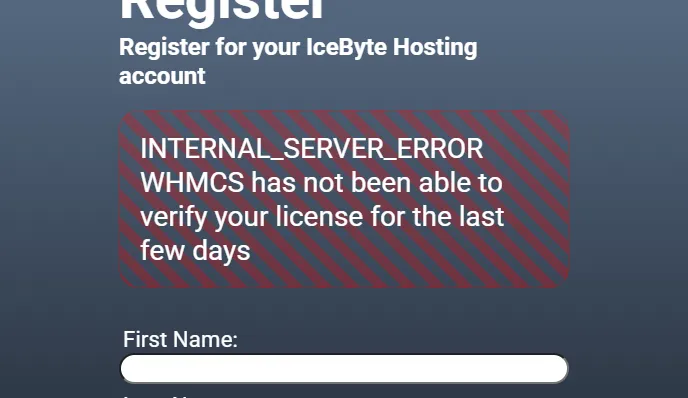
The most legacy of tooling we are using, is WHMCS. Given this is closed-source software, built with PHP (a programming language not known for its speed and security), that we’ve been having consistent auto-payment issues, and have been wrangling with its rough API, this is something we’re hoping to replace in the future.
Design tools
For specific design tools, Bea mocked up the design in Figma, arguably the most popular design tool as of writing. It is a closed-source, mostly free designing program accessible in a web browser. There was no automated token transferring between Figma and our Astro website, because we haven’t figured that out.
She also used contrast.tools to check for text and background color contrast, loosely trying to target the draft APCA standard.
Despite Tailwind CSS not being used in our final product, many of the colors were first derived from Tailwind CSS’s built-in color palette, and many design cues from the Tailwind CSS typography plugin.
Did we use AI?
For quite a bit of marketing copy on our About Us page, unfortunately yes.
Otherwise, this website as of writing, including art assets, are made by cats and (oh right) human beings alike. Programming was done all done by hand. I, Bea, can at least guarantee this article was not written using generative AI.
Technical considerations
Optional JavaScript
Cat really, really cares about having JavaScript be optional.
To Tailwind, or not to Tailwind?
A problem Bea encountered, was getting used to a non-Tailwind CSS workflow, and simply using plain CSS. Cat is a lot more familiar with this workflow, as they made the previous site with plain CSS, hence the decision to continue to use plain CSS.
For those unaware, Tailwind CSS is a way to write styles for websites, and is somewhat controversial in the web development space.
Some find it messy, as the class names (effectively) required to use Tailwind CSS makes your source code look incredibly bloated. Others find it a very quick and useful shorthand, and helps them avoid having to name things.
Naming things may not sound like a huge problem, but it’s become a common joke with programmers, to acknowledge this funny-but-true reality.
Although she isn’t super happy with just using plain CSS, Bea’s gotten used to it, and has seen some worthwhile benefits especially in regards to rolling their own typography settings.
We only experienced some of hell
Here’s the things that kinda went wrong.
Time and corner cutting
The site took significantly longer than expected. Bea estimated roughly 50 hours for the design, and although responsive layouts and tens of pages were made, quite a couple things were cut from the mockup.
Things cut included a light mode and prototyping animations. Typography, other than weights, font sizing, and line heights, was mostly done on-the-fly without any proper definitions; especially regarding margins. Setting up Figma prototyping was not a priority, and was mostly felt unfinished in that regard.
One problem with the Figma design, was that colors weren’t well-defined. There were plenty of similar colors, and there was some confusion with the implementation of the design tokens (ex. colors, line heights, font sizes) into our CSS.
Cat unfortunately grossly underestimated how much time it’d take to implement the design. Responsiveness proved to be difficult to implement, especially regarding the “bento box” style section on the homepage. There were many elements that needed animations that the Figma design did not account for.
CSS reset
We also applied a CSS reset somewhat late into development. We were under the impression that CSS resets were necessary for layout discrepancies between browsers, although the article attached to Josh W. Comeau’s modern CSS reset clarifies that it probably isn’t a problem nowadays.
Given this information, I am not sure if we broke a lot of our margins for no good reason.
Still, we applied that reset, with the benefit of having box-sizing: border-box by default. This caused us some confusion when we were fighting the browser default of box-sizing: content-box, wondering why our padding wasn’t working. Yes, this is mildly embarrassing to admit.
Accessibility considerations
Bea really, really cares about accessibility. You might be sensing a pattern here.
Spinny things make Bea dizzy
Having some vestibular motion issues, elements such as the homepage’s rotating icons pose a threat to Bea’s ability to not feel nauseous.
Future plans for light mode
One of our future plans, is that we’d like to add a light mode toggle. Although many users may scoff at the idea of light mode, accessibility matters to us (or at least, to Bea). Users that may find dark mode comfortable, may find it incredibly uncomfortable in different contexts.
One common example is trying to read text on screens in daylight. In such scenarios, to have an equal amount of comfort reading text, they’d have to disproportionately increase their screen’s brightness.
Depending on the environment and display, the screen simply may not be bright enough to overpower the sun. For the same nits of screen brightness, light mode can help readability.
Does this mean we’re going to get rid of our dark mode in favor of light mode? Not at all.
The argument of brightness in different settings also applies here too. In a dimly-lit room,
Final thoughts
On behalf of all of IceByte, we hope you enjoy the new website experience.